You have a digital footprint. You have never actually seen it.
Instagram knows what it showed you, when, how often, and what you did about it. It just never shows you. This turns your own data export into a dashboard you can read — themes, rhythm, attention, the accounts you keep watching without ever admitting it, and where the friction is.
Takes about 5 minutes. Needs a Google account and an Instagram data export.
This is not a service and there is no server of mine to send anything to. You run your own private copy: the script lives in your Google Drive, reads the export sitting in your own folder, and writes to your own spreadsheet. Nothing is uploaded, nothing is sent to an AI, and I cannot see any of it — that is not a policy, it is just how the thing is built. The code is open, so you can check.
01Why bother
The mission is narrow and worth saying plainly: higher consciousness about our digital footprints, and better digital well-being. Not a detox app, not a lecture about screen time. Evidence about your own behaviour, in your hands, that nobody else gets a copy of.
What you see is chosen for you. Once it is laid out by theme and hour, you can see the shape of that choice — and how much of your attention went somewhere you never picked.
Likes are what you are willing to show. Repeated viewing is what actually held you. The gap between those two is the most honest thing in the whole export.
Late-night drift, a narrowing feed, an emotional tone creeping one way. These are measurable, and measurable things can be answered.
Meta must hand it over when you ask. Almost nobody does, because the export is a pile of unreadable HTML. This makes it readable — and keeps it yours.
02What you get
A spreadsheet with about twenty tabs, and a private dashboard that reads it. Every number is rule-based and every rule is visible and editable — nothing here is a judgement about you.
What the feed actually fed you, by share, with subtopics and month-on-month movement.
Hour by hour and weekday by weekday. Estimated minutes, sessions, late-night share.
Accounts you kept seeing and never once reacted to — attention you give but do not express.
Everyone you follow, who follows you, and who the feed keeps pushing, drawn as a graph.
Seen, Heard, Invested in, Connected — scored where the data allows, and marked unmeasurable where it does not.
Eleven behavioural indicators scored likelihood × impact, with what to try for each.
03Set it up
Two things happen once, then it runs itself. If you get stuck at any step, open an issue — a confusing step is a bug in this page, not in you.
-
Ask Instagram for your data
Do this first — Meta can take a few hours to a day to send the first one.
Open Instagram on your phone and follow these. The screenshots are in Italian because that is how the person who made them has Instagram set; the English names are next to each one, and the buttons are in exactly the same places.
- Tap the ☰ button, top right. Then tap Settings and activity.
- Tap Centro gestione account — Accounts Centre. It's the first thing on the list, with the Meta logo beside it.
- Tap Le tue informazioni e autorizzazioni — Your information and permissions.
- Tap Esporta le tue informazioni — Export your information.
- Tap Crea esportazione — Create export. It asks which account. Pick the one you want to look at.
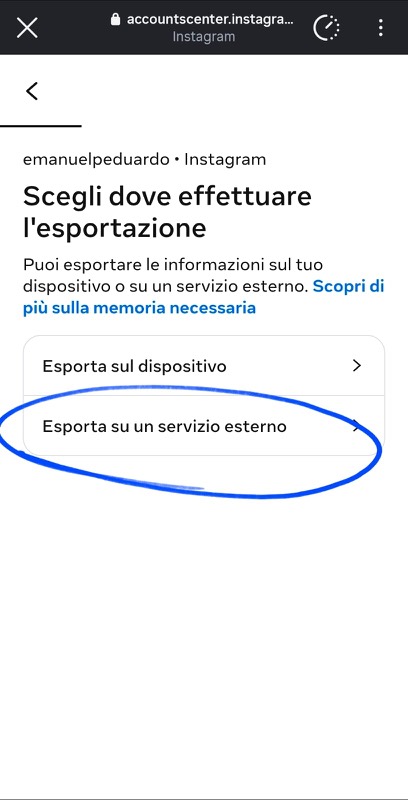
- Now it asks where to send it. Tap Esporta su un servizio esterno — Export to a third-party service.
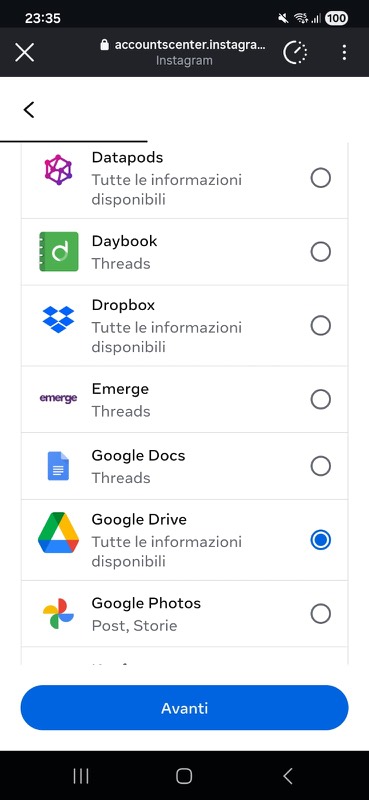
- Pick Google Drive from the list.
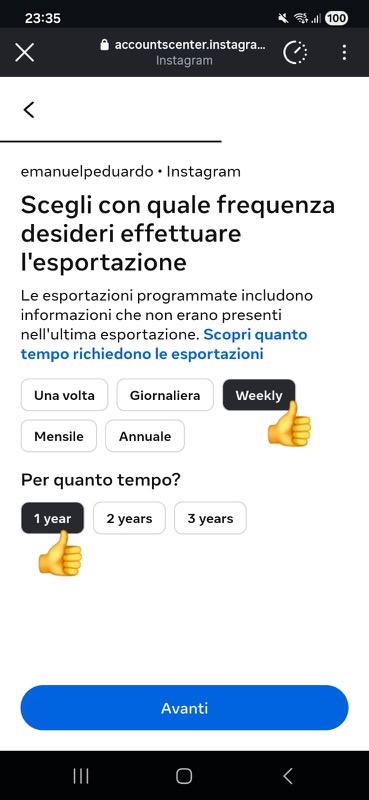
- It asks how often. Tap Weekly. Then it asks for how long — pick 1 year or more. Tap Collega (Link), sign in to Google, and say yes when it asks for permission.
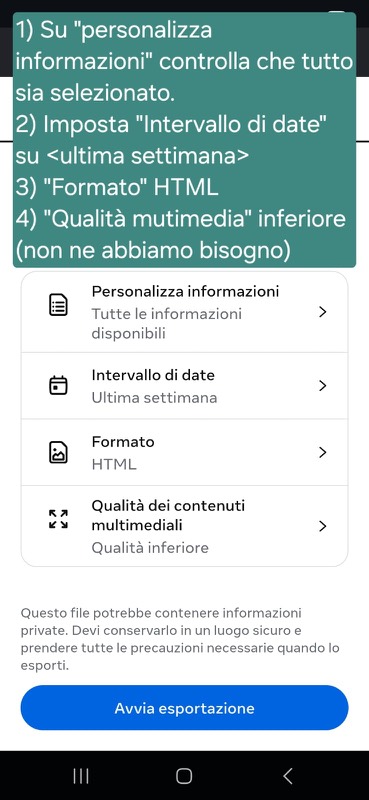
- One last screen, with four settings. Set all four, then tap Avvia esportazione
(Start export).
Setting Set it to Personalizza informazioni everything ticked Intervallo di date Ultima settimana (last week) Formato HTML Qualità dei contenuti multimediali Qualità inferiore (lower)
Step 2Centro gestione account1 / 8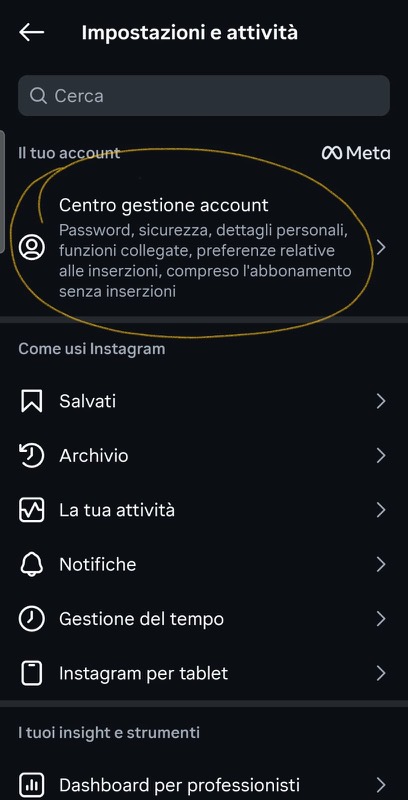
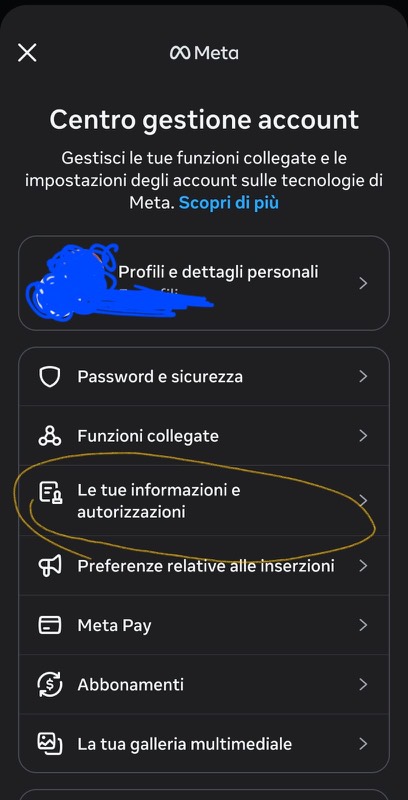
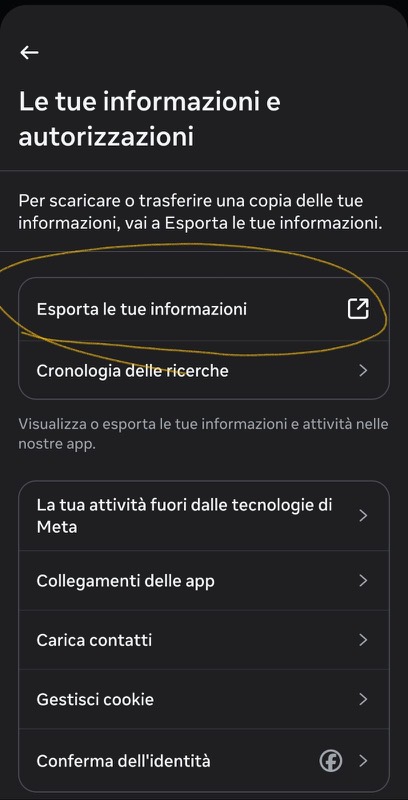
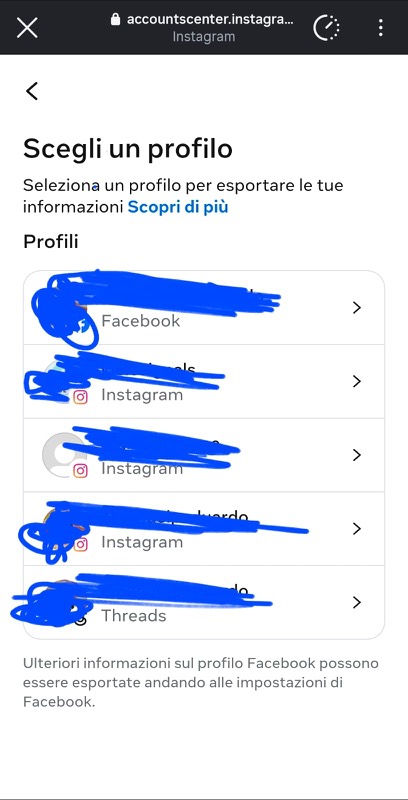
 Two things people get wrong here. Both quietly break everything, and neither gives you an error.
- Format must be HTML, not JSON. A JSON export is skipped and nothing ever appears.
- Weekly, not monthly. Instagram only remembers about seven days of what you looked at. A monthly export does not contain a month — it contains the last week, and you lose the other three.
English and Italian exports both work. Other languages will parse partially — the dates and field labels are what have been checked so far. -
Make your own copy of the sheet
One click. You get a private copy in your own Drive with the script already inside — no code to paste.
Prefer to read the code before running it? Every line is on GitHub, and the README has the manual paste-it-yourself route. -
Click Setup once, in the sheet's own menu
- Reload the spreadsheet tab. This matters — the menu only appears when the sheet opens.
- Look at the menu bar. There is a new menu called Instagram Insights, just after "Help". Click it.
- Click Setup (run once).
- Google asks for permission. Click through and pick your Google account.
- You'll then see a screen saying "Google hasn't verified this app". Click Advanced, then Go to (project name), then Allow.
You never need to open the script editor. That's the whole setup.
That warning screen is expected, and it is fine. It is your copy of the script, running as you, on your own data. Google hasn't checked it because nobody ever submitted it to be checked — verification is for scripts that touch other people's accounts, and this one never does.If clicking Setup seems to do nothing after you allow access, click it once more. The first click is sometimes used up by the permission screen. -
That's it — now it runs itself
Because you set the export to go straight to Google Drive on a weekly schedule in step 1, there is nothing left for you to do. Instagram drops each delivery into your Drive, the script finds it, files it into the Instagram Exports folder and reads it. It checks once a day by itself.
To see your data: Instagram Insights → Open dashboard. To make it check Drive right now instead of waiting for tomorrow, use Process new exports now, or the Check Drive now button in the dashboard.
If you chose a one-off export instead of the schedule, this is the one step that stays manual: drop the .zip Meta emails you into the Instagram Exports folder in your Drive, then run Process new exports now. Unzipping is optional, and the Drive app on your phone works fine.
04Optional: the dashboard on its own URL
Opening the dashboard from the sheet's menu needs no setup at all, and for most people that is enough. Deploying it as a web app gives it a URL of its own — handy on a phone, or to open without going through the spreadsheet first.
In the sheet: Extensions → Apps Script → Deploy → New deployment → Web app, with Execute as: Me and Who has access: Only myself.
05Where this is going
Work in progressThis is unfinished and openly so. It starts at Instagram because that export is the richest one Meta actually hands over — but Instagram is the starting point, not the point. Anything that leaves a digital footprint you are entitled to read could be pulled into the same frame, always under the same rule: your data stays in your account.
- WorkingInstagramThemes, rhythm, quiet interests, network graph, belonging, risk register.
- NextBelonging, properlyTwo of its four dimensions cannot be measured from an Instagram export at all. The dashboard says so out loud instead of faking a score — closing that gap needs better sources.
- NextOutward, not just inwardThe dashboard describes consumption. The first feature that points outward — real places and groups near you, by interest — is designed and not yet built.
- LaterOther footprintsOther platforms that offer real data exports, and a way to read several of them side by side.
- LaterLonger memoryMost of what matters only becomes visible across a year, not a week. That needs time and exports, not code.
Requests and disagreements are genuinely useful here — especially "this number is wrong and here is why". The rules behind every metric are editable in the Settings tab of your own copy, so you can also just fix it for yourself.
Free, and staying free
There is nothing to buy, no account to make, no upsell and no data of yours to sell — there could not be, since none of it ever reaches me. If it was useful and you feel like it, you can put something in the tin. Entirely optional, and it changes nothing about what you get.
This is being built independently, with no ads and no data selling. If you’d like to support a calmer, more community-based way to do mental health tech, you can chip in with a small donation.
06Join in
Tell me what broke, what was confusing, or what you found out about yourself that you did not expect. That last one is the whole reason this exists.
Share it
Most people do not know they can ask for this data at all.
Instagram and TikTok allow no prefilled link, so those two copy the link and open the app — paste it into your story or bio.
Thank you for being here
Every person who runs this, breaks it, argues with a number or tells someone else about it is doing the actual work — making our own digital footprints something we can look at directly instead of something that just happens to us. That is the whole project. Thank you for taking part.